
Automated Update of a BookStack Page
To update a bookstack page from data files I created two simple scripts, a template and some data files. There a quite some solutions out there like gomplate and such, but I wanted something simple and more or less tool independent based on system libraries from python or go or even bash. I ended with python, because why not.
This describes the process of how I update my Inventar page here in the wiki from a bunch of csv files.
First create a venv with python. You don't need it, but I like to have things separated and isolated.
python -m venv veneHow to activate it depends on your operating system.
Next open VSCode and create the python scripts and the template. In the end it maybe looks like this:
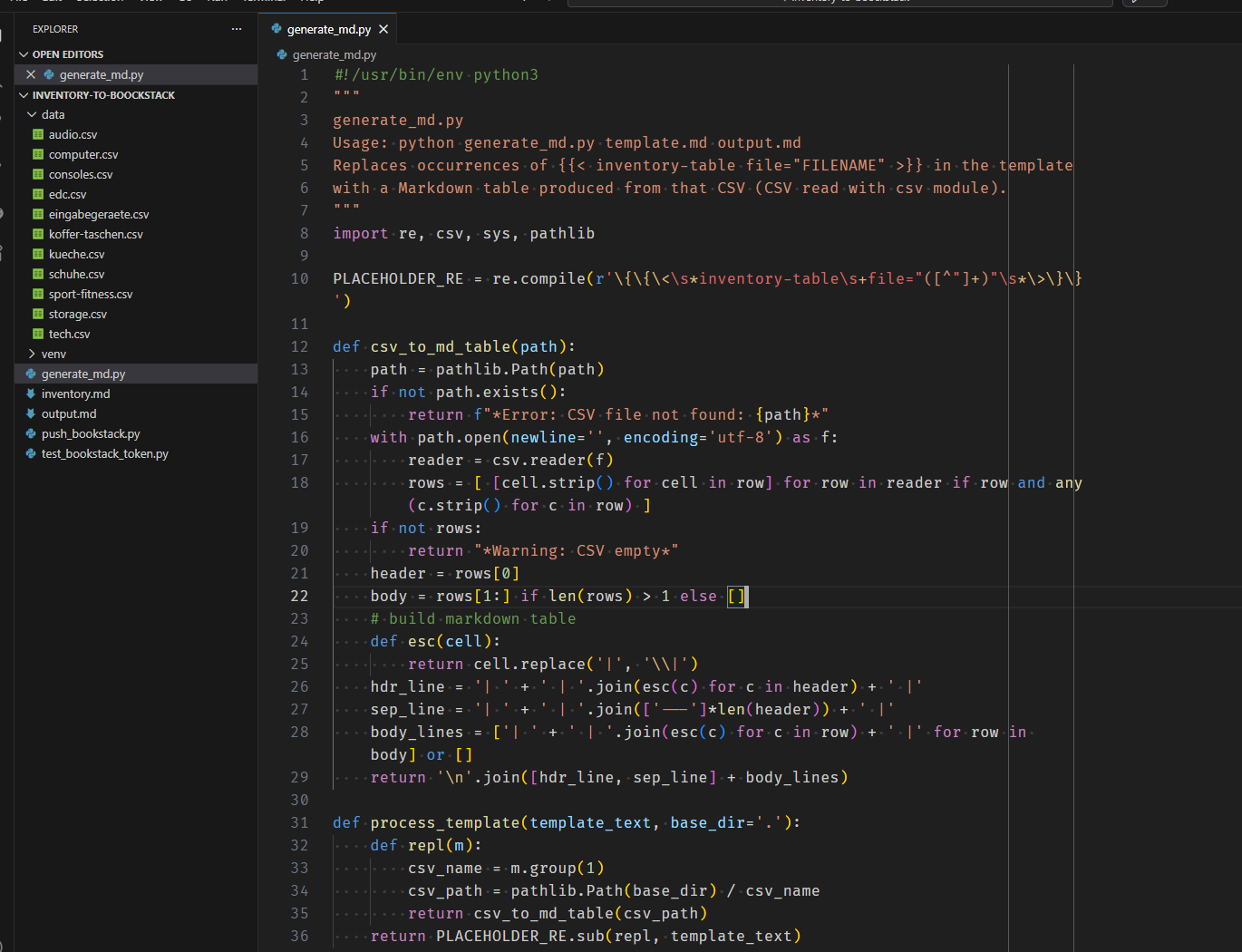
generate_md.py
This is the python script that turns your template into a nice filled markdown file by combining the markdown template and the data from the csv files. It will scan the date folder and replace only those placeholders it can find for the file.
#!/usr/bin/env python3
"""
generate_md.py
Usage: python generate_md.py template.md output.md
Replaces occurrences of {{< inventory-table file="FILENAME" >}} in the template
with a Markdown table produced from that CSV (CSV read with csv module).
"""
import re, csv, sys, pathlib

PLACEHOLDER_RE = re.compile(r'\{\{\<\s*inventory-table\s+file="([^"]+)"\s*\>\}\}')

def csv_to_md_table(path):
    path = pathlib.Path(path)
    if not path.exists():
        return f"*Error: CSV file not found: {path}*"
    with path.open(newline='', encoding='utf-8') as f:
        reader = csv.reader(f)
        rows = [ [cell.strip() for cell in row] for row in reader if row and any(c.strip() for c in row) ]
    if not rows:
        return "*Warning: CSV empty*"
    header = rows[0]
    body = rows[1:] if len(rows) > 1 else []
    # build markdown table
    def esc(cell):
        return cell.replace('|', '\\|')
    hdr_line = '| ' + ' | '.join(esc(c) for c in header) + ' |'
    sep_line = '| ' + ' | '.join(['---']*len(header)) + ' |'
    body_lines = ['| ' + ' | '.join(esc(c) for c in row) + ' |' for row in body] or []
    return '\n'.join([hdr_line, sep_line] + body_lines)

def process_template(template_text, base_dir='.'):
    def repl(m):
        csv_name = m.group(1)
        csv_path = pathlib.Path(base_dir) / csv_name
        return csv_to_md_table(csv_path)
    return PLACEHOLDER_RE.sub(repl, template_text)

def main():
    if len(sys.argv) < 3:
        print("Usage: python generate_md.py template.md output.md")
        sys.exit(2)
    tpl_path = pathlib.Path(sys.argv[1])
    out_path = pathlib.Path(sys.argv[2])
    base_dir = tpl_path.parent / "data"
    tpl_text = tpl_path.read_text(encoding='utf-8')
    result = process_template(tpl_text, base_dir=base_dir)
    out_path.write_text(result, encoding='utf-8')
    print(f"Wrote {out_path}")

if __name__ == '__main__':
    main()
Markdown Template inventory.md
This is the template which I use. You can of course create your own. It is based on a structure used by Hugo static site generator which I used before. I kept it this way so if I ever want to go back I can just reuse the file with Hugo again.
Diese Seite ist mein Werkzeug zur Achtsamkeit und Kontrolle.
Hier dokumentiere ich mein Setup, um Redundanz zu vermeiden
und den Fokus auf Qualität statt Quantität zu legen.

> "Alles, was du besitzt, besitzt irgendwann dich."

Dieser Gedanke begleitet mich seit Beginn 2025 verstärkt,
als ich mich entschied, aktiver einem minimalistischen Lebensstil
zu folgen und mich von unnötigem Ballast zu befreien.

Da wir nun schon eine ganze Weile an einem Ort wohnen,
haben sich doch sehr viele Dinge angesammelt.
Trotz schnell wechselnder politischer und wirtschaftlicher
Rahmenbedingungen lebe ich in einer privilegierten Situation,
die es mir erlaubt, die ein oder andere Anschaffung zu tätigen.
Ich versuche dabei stets bewusst zu konsumieren
und den Fokus auf Qualität und Langlebigkeit zu legen.

## EDC

Siehe auch die [EDC-Seite](/edc/) und [Telefon](/phone)-Seite
für Details zu meinen täglichen Begleitern.

{{< inventory-table file="edc.csv" >}}

## Computer

Siehe auch die [Computer-Seite](/computer/) für Details zu meinen Computern und deren Konfigurationen.

{{< inventory-table file="computer.csv" >}}

## Konsolen

{{< inventory-table file="consoles.csv" >}}


## Tech

{{< inventory-table file="tech.csv" >}}

## Eingabegeräte

{{< inventory-table file="eingabegeraete.csv" >}}

## Audio

{{< inventory-table file="audio.csv" >}}

## Storage

{{< inventory-table file="storage.csv" >}}

## Sport & Fitness

{{< inventory-table file="sport-fitness.csv" >}}

## Koffer und Taschen

{{< inventory-table file="koffer-taschen.csv" >}}

## Kleidung

### Jacken

### T-Shirts

### Hosen

### Schuhe

{{< inventory-table file="schuhe.csv" >}}

### Socken

### Diverses

## Küchen Equipment

{{< inventory-table file="kueche.csv" >}}

## Toilettenartikel
Generate output.md
To gegenrate the output.md file you run the python script with the template and the desired outpu filename
pythonPush to Bookstack
The interesting part is the push to Bookstack. This is done through the API. You need to create an API Token first. This can be done in your users Account Settings
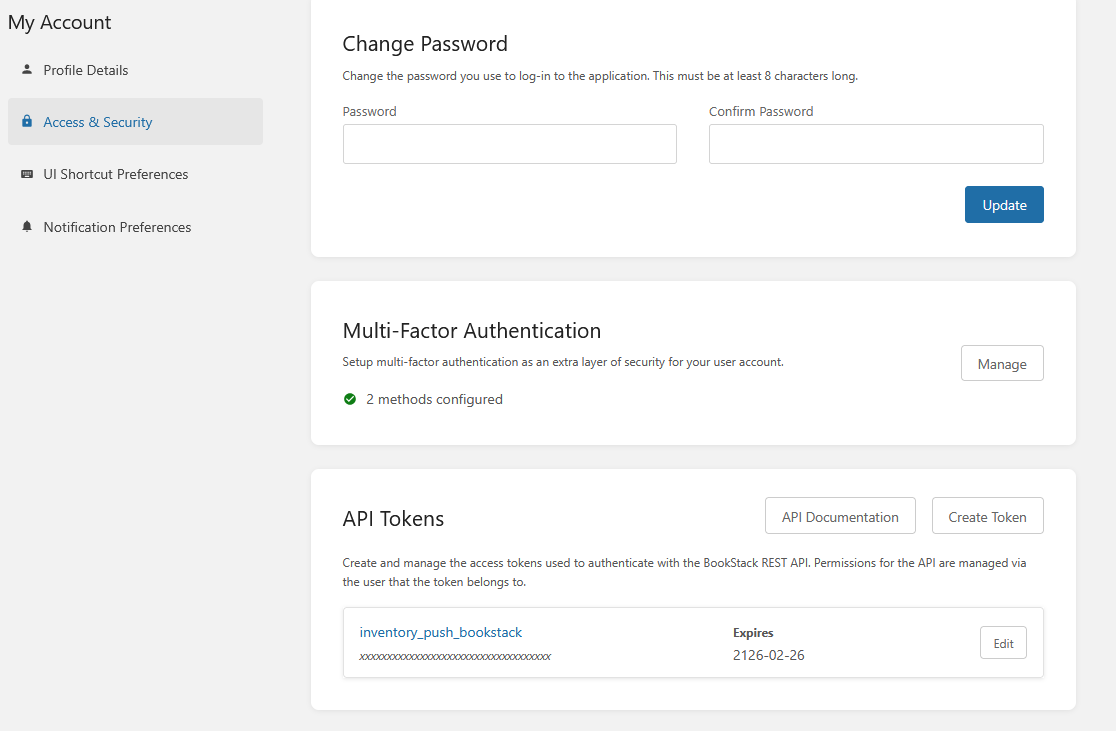
Write down the TokenID and the secret. The secret will only be shown once. So make sure to save it somewhere.
The push_bookstack.py Script
Next wee need the push script:
#!/usr/bin/env python3
# Usage: export BOOKSTACK_BASE="https://wiki.zn80.net"
#        export BOOKSTACK_TOKEN="user_token"    # or user:app
#        python push_bookstack.py output.md PAGE_ID
import os, sys, requests, json, pathlib

BASE = os.environ.get("BOOKSTACK_BASE")
TOKEN = os.environ.get("BOOKSTACK_TOKEN")
if not BASE or not TOKEN or len(sys.argv) < 3:
    print("Usage: set BOOKSTACK_BASE and BOOKSTACK_TOKEN; python push_bookstack.py output.md PAGE_ID")
    sys.exit(2)

md_path = pathlib.Path(sys.argv[1])
page_id_or_slug = sys.argv[2]
md = md_path.read_text(encoding="utf-8")

headers = {"Authorization": f"Token {TOKEN}", "Content-Type": "application/json"}

def get_page(pid):
    r = requests.get(f"{BASE}/api/pages/{pid}", headers=headers, timeout=10)
    r.raise_for_status()
    return r.json()

# prefer sending html. convert markdown -> html if python-markdown available, else send markdown.
def md_to_html(text):
    try:
        import markdown
        return markdown.markdown(text, extensions=['extra','sane_lists'])
    except Exception:
        return None

try:
    page = get_page(page_id_or_slug)
except requests.HTTPError as e:
    print("Failed to fetch page:", e, getattr(e.response, "text", ""))
    sys.exit(1)

page_id = page.get("id")
page_name = page.get("name") or page.get("title") or "Updated Page"

html = md_to_html(md)
payload = {"name": page_name}
if html:
    payload["html"] = html
else:
    payload["markdown"] = md

r = requests.put(f"{BASE}/api/pages/{page_id}", headers=headers, data=json.dumps(payload), timeout=20)
if r.status_code in (200,201):
    print("Updated page:", r.json().get("id"))
else:
    print("Update failed:", r.status_code, r.text)
    sys.exit(1)
To run this you export the export BOOKSTACK_BASE and BOOKSTACK_TOKEN first. The BOOKSTACK_TOKEN is a combination of the ID and Secret: <TockenID>:<Secret>. Similar to this
export BOOKSTACK_TOKEN=xxxxxxxxxxxxYBgSsVCY1tJg6OFxxxxx:xxxxxxY7op4hkBBJBZCzKCxxxxxxxxxxxThe BOOKSTACK_BASE is the URL of your Bookstack installation on the internet.
Important:
To run it, you also need the page id as a number. To get this number you can select some text on the page you want to update and take the ID from there.
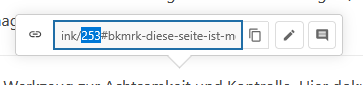
It is the number before the pound sign.
Execute the scripts
You can then execute the scripts:
$ python generate_md.py inventory.md output.md
Wrote output.md

$ python push_bookstack.py output.md 253
Updated page: 253
When you now refresh the page. The new content should be there.
Test-Script
This test script is to test the API token combination before making changes. Use it the same way as the push script. Export env first and then run it. Help is provided.
#!/usr/bin/env python3
"""
Test BookStack API token(s).

Usage:
  export BOOKSTACK_BASE="https://wiki.zn80.net"
  export BOOKSTACK_TOKEN="user_token"            # or "user_token:app_token"
  python test_bookstack_token.py
"""
import os, sys, requests

BASE = os.environ.get("BOOKSTACK_BASE")
TOKEN = os.environ.get("BOOKSTACK_TOKEN")

if not BASE or not TOKEN:
    print("Set BOOKSTACK_BASE and BOOKSTACK_TOKEN environment variables.")
    sys.exit(2)

headers = {"Authorization": f"Token {TOKEN}"}
try:
    r = requests.get(f"{BASE}/api/user", headers=headers, timeout=10)
except requests.RequestException as e:
    print("Request error:", e)
    sys.exit(1)

if r.status_code == 200:
    try:
        j = r.json()
        print("Token OK. Authenticated user:", j.get("name") or j.get("email") or j)
    except Exception:
        print("Token OK. Received 200 but could not parse JSON.")
    sys.exit(0)
elif r.status_code == 401:
    print("Unauthorized (401): token invalid or expired.")
else:
    print(f"Unexpected status {r.status_code}: {r.text}")

sys.exit(1)
No comments to display
No comments to display